open-payment-host

Open Payment Host


Sell Subscriptions, Newsletters, Digital Files without paying commissions.

What
Open Payment Host is an easy to run self-hosted, minimalist payments host through which we can easily sell our digital items without paying double commissions while having total control over our sales and data.
Why
Selling digital items on web as an indie requires using platforms where we have to pay double commissions(to the platform and the payment gateway) and our content is forever locked within those platforms.
Who
-
Those who are looking to self-host an alternative for Gumroad, Buy Me a Coffee, Ko-fi etc.
-
Those who churn out lot of projects and don’t want to integrate payment gateway every time.
-
Those who want to use multiple payment gateways for different countries e.g. for parity pricing or for redundancy.
How
Open Payment Host is a minimalist yet highly performant Go web application with innovative features which helps indies self-host and sell digital items with little effort.
One Click Deployment

Features
- WYSIWYG editor to create beautiful product pages.
- One Time and Subscription payments support.
- Stripe support, Just add the price id for the product and rest is done automatically.
- Paypal support, Just add the plan id for the product and rest is done automatically new.
- Razorpay support, Just add the plan id for the product and rest is done automatically new.
- Square support, Just add the amount for the product and rest is done automatically.
- Customers can buy without logging in, Increases conversion.
- Multi-country pricing, Price changes automatically according to the user’s location resulting in better conversion.
- Light and Dark theme.
- Listmonk, Mailchimp support, Customers are automatically added to a audience list; Useful for sending newsletters.
- File attachment support(images) for the product posts.
- S3 and Cloudflare R2 support for delivering digital files via automatic pre-signed URL.
- Subscriber count for the products.
- Automatic SSL and other security features for production.
- Automatic payment gateway router based on countrynew
- API & Webhook experimental.
Production Demo
https://payments.abishekmuthian.com
WIP
This is a work in progress project, although I put lot of effort in ensuring security and stability of the platform users should be aware of possible unknown bugs. That said, I use Open Payment Host as payments host for my own projects.
Immediate Goals
- Product pages
- Stripe integration
- Square integration
- Paypal integration
- Razorpay integration
- Payment router
- File download
- Documentation website
- Accessibility
Long Term Goals
- Paddle integration
- PayU integration
- Cashfree integration
- Direct banking API integration
- Community features
- Localisation
If you would like to help me achieve these goals, consider sponsoring me

Screenshots
Home

WYSIWYG editor

Buy without login
Square

No credit card data is stored locally
Stripe

Square

Strong customer authentication (3D-Secure, SCA) support

File delivery after payment
Stripe

Square

Automatic payment gateway router
Paypal
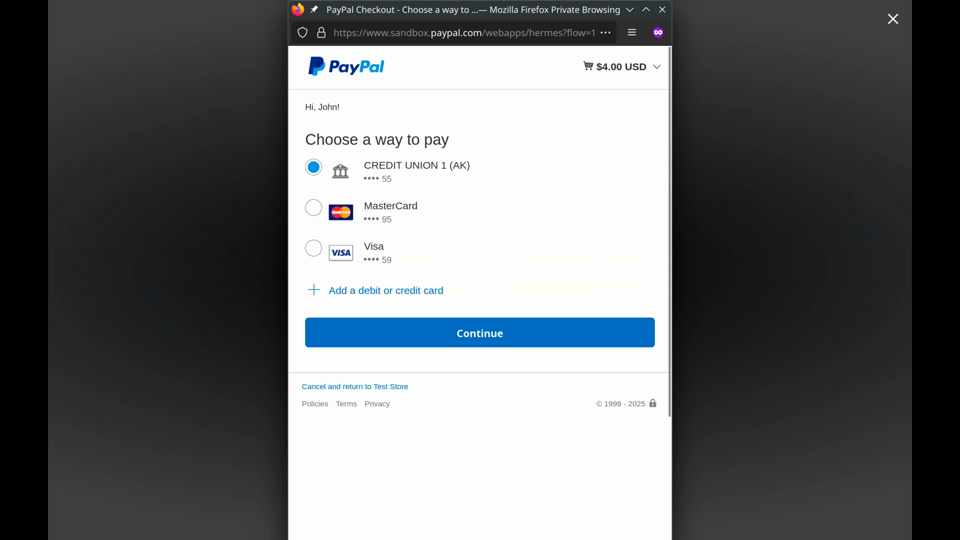
Watch the PayPal routing demo (4-second MP4)
Razorpay
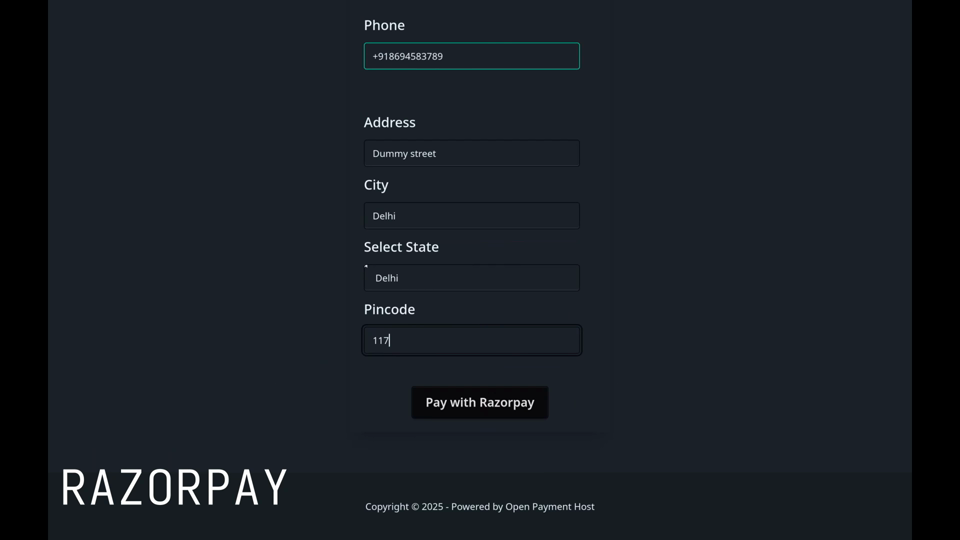
Watch the Razorpay routing demo (4-second MP4)
Usage
Requirements
-
Stripe or Square or Paypal or Razorpay account for payment gateway.
-
Cloudflare account for turnstile captcha.
-
Mailchimp account for adding subscribers to the list.
Note: Open Payment Host can be tested without fulfilling above requirements, But payments and adding subscribers to the list wouldn’t work.
Docker
The latest image is available on DockerHub at abishekmuthian/open-payment-host:latest.
Demo Setup
mkdir oph-demo && cd oph-demo
sh -c "$(curl -fsSL https://raw.githubusercontent.com/abishekmuthian/open-payment-host/main/samples/oph-demo/install-demo.sh)"
Visit http://localhost:3000.
Demo version prints more detailed level of errors if any, DO NOT use this demo setup in production.
Login
The default admin email id is [email protected] and the password is OpenPaymentHost. You’ll be asked to reset the password after login for security reasons. That password is hashed and stored.
You’ll be logged out after changing password automatically to login with the new credentials.
Admin email id and default admin password can be changed in the config file (explained below) after the first run. Each time the password is reset in the config file, The password needs to be changed again once logged in for security.
Production Setup
It’s recommended to try the demo application first before using the production application. The production application requires a registered domain and special config variables for SSL as detailed in the configuration section.
mkdir oph-production && cd oph-production
sh -c "$(curl -fsSL https://raw.githubusercontent.com/abishekmuthian/open-payment-host/main/samples/oph-production/install-production.sh)"
After the container has started successfully, Stop the container, Set the required production configuration and re-run the container.
Configuration
Config file fragmenta.json is located in the secrets folder. It is generated automatically during the first run, After editing the config file the application needs to be restarted for the new configuration to take effect.
fragmenta.json contains configuration for both development and production. The production configuration is loaded when the environment variable FRAG_ENV=production is set.
Note: Environment variable for production is set automatically when using the docker production setup.
User configurable values are included in the table below.
| Key | Description | Value |
|---|---|---|
| admin_email | Email id of the administrator. | Default: [email protected] |
| admin_default_password | Default password of the administrator, Would be forced to changed after login. | Default: OpenPaymentHost |
| reset_admin | Reset the email and password of the admin during the next run. | yes (or) no |
| domain | Website domain name for the application. | Dev: localhost, Prod: example |
| port | Port of the application. | Dev: 3000, Prod: 443 (SSL) |
| root_url | FQDN for the application with protocol and port. | Dev: http://localhost:3000, Prod: https://example.com |
| autocert_domains | Comma separated domains for SSL certificates. | Demo: NA, Prod: www.example.com, example.com |
| autocert_email | email id for SSL certificate related notifications. | Demo: NA, Prod: [email protected] |
| autocert_ssl | Enable or Disable automatic ssl | Demo: NA, Prod: yes/no |
| name | Name of the website. | Default: Open Payment Host |
| meta_title | Title of the website. | Default : Sell what you want without paying commissions |
| meta_desc | Description of the website. | Default: Sell Subscriptions, Newsletters, Digital Files without paying commissions. |
| meta_keywords | Keywords for the website. | Default: payments,subscription,projects,products |
| meta_image | URL for the featured image for the website. | Default: /assets/images/app/oph_featured_image.png |
| meta_url | Meta URL for the page when its not generated automatically. | Dev: http://localhost:3000, Prod: https://example.com |
| square | Enable the square payment gateway, When enabled all other square credentials are mandatory. | Dev/Prod : yes,no |
| square_access_token | Square access token for accessing your square account. | Dev: Sandbox access token, Prod: Production access token |
| square_app_id | Square app id to identify your application. | Dev: sandbox-…, Production: production app id |
| square_location_id | Square location id for the account | Dev: Sandbox location id from test account, Prod: location id from the main account |
| square_notification_url | Square notification url for the webhook. | Dev:Sandbox webhook URL, Prod: Production webhook URL |
| square_signature_key | Square signature for webhook authentication | Dev: Sandbox webhook signature, Prod: Production webhook signature |
| square_sandbox_source_id | Square sandbox source id for credit card | Dev: cnon:card-nonce-ok, Prod:”” |
| square_domain | Square API domain | Dev: https://connect.squareupsandbox.com/v2, Prod: https://connect.squareup.com/v2 |
| s3_access_key | S3 compatible access key | Dev: NA,Prod: NA |
| s3_secret_key | S3 compatible secret key | Dev: NA, Prod: NA |
| s3_endpoint | S3 compatible endpoint. Leave empty for AWS S3. For Cloudflare R2 set https://<account_id>.r2.cloudflarestorage.com |
Dev: NA, Prod: NA |
| s3_region | Region for signing. Defaults to us-east-1 when empty. Use auto for R2. |
Dev: NA, Prod: NA |
| stripe | Enable the stripe payment gateway, When enabled all other stripe credentials are mandatory. | Dev/Prod : yes, no |
| stripe_key | Stripe developer key. | Dev: pktest…, Prod: pklive…**** |
| stripe_secret | Stripe developer secret key. | Dev: sktest…, Prod: sklive… |
| stripe_webhook_secret | Stripe webhook signing secret | Dev: whsec_xxx, Prod: whsec_xxx |
| stripe_tax_rate_[ISO 3166-1 alpha-2] | Stripe tax id for a country represented by [ ISO 3166-1 alpha-2] code eg. stripe_tax_rate_US | Dev: txr…, Prod: txr… |
| stripe_callback_domain | Root URL for callback after Stripe event. | Dev: [Use tunnel like ngrok], Prod: [Use root_url] |
| subscription_client_country | Test country for testing multi-country pricing. | Dev: US, IN, FR etc. Prod: NA |
| mailchimp_token | Mailchimp API Key. | e.g. …-us12 |
| listmonk_URL | Base URL of the Listmonk instance used to add purchasers to product-specific lists. | e.g. https://listmonk.example.com |
| listmonk_API_token | Listmonk API credentials in api_key:token format. |
e.g. oph:secret-token |
| listmonk_preconfirm_subscriptions | Preconfirm Listmonk subscriptions. Set to no or false to use double opt-in lists. |
Default: true; true values: true, yes, 1, on |
| turnstile_secret_key | Cloudflare turnstile secret key for captcha. | Dev: 1x00000000000000000000AA, Prod: 0x… |
| turnstile_site_key | Cloudflare turnstile key for captcha. | Dev: 1x0000000000000000000000000000000AA, Prod: 0x… |
| paypal | Enable the paypal payment gateway, When enabled all other paypal credentials are mandatory. | Dev/Prod : yes,no |
| paypal_domain | sandbox or production domain domain | Dev: https://www.sandbox.paypal.com , Prod: https://www.paypal.com |
| paypal_api_domain | sandbox or production API domain | Dev: https://api-m.sandbox.paypal.com , Prod: https://api-m.paypal.com |
| paypal_client_id | Paypal client ID | Dev: XXX, Prod: XXX |
| paypal_client_secret | Paypal client secret | Dev: XXX, Prod: XXX |
| paypal_webhook_id | Paypal webhook ID | Dev: XXX, Prod: XXX |
| razorpay | Enable the razorpay payment gateway, when enabled all other razorpay credentials are mandatory. | Dev/Prod: yes |
| razorpay_key_secret | Razorpay key secret | Dev: XXX, Prod: XXX |
| razorpay_webhook_secret | Razorpay webhook secret | Dev: XXX, Prod: XXX |
| whatsapp_number | Whatsapp number for customer support | Phone number without +,space or dash e.g. 15551234567 |
Stripe Webhook Setup
Webhook needs to be setup at Stripe Developer’s section for receiving subscription details post payment.
Set the webhook to root_url/subscriptions/stripe-webhook where the root_url is defined in the configuration above. To test the webhooks in the local environment, Use a tunnel like ngrok.
Set the following events to send:
checkout.session.completedinvoice.paidinvoice.payment_failedcustomer.subscription.deletedcharge.refunded
Square Webhook Setup
Webhook needs to be setup at Square Developer’s section for receiving subscription details post payment.
Set the webhook to root_url/subscriptions/square-webhook where the root_url is defined in the configuration above. The URL configured in Square must exactly match square_notification_url, including its scheme, hostname, path, and trailing slash, because Square includes the notification URL when calculating webhook signatures. To test the webhooks in the local environment, use a tunnel like ngrok.
Set the following events to send:
payment.updatedinvoice.payment_maderefund.updatedsubscription.updated
PayPal Webhook Setup
Webhook needs to be setup at Paypal Developer’s section for receiving subscription details post payment.
Set the webhook to root_url/subscriptions/paypal-webhook where the root_url is defined in the configuration above. To test the webhooks in the local environment, Use a tunnel like ngrok.
Set the following events to send:
PAYMENT.CAPTURE.COMPLETEDPAYMENT.SALE.COMPLETEDPAYMENT.CAPTURE.REFUNDEDPAYMENT.SALE.REFUNDEDBILLING.SUBSCRIPTION.ACTIVATEDBILLING.SUBSCRIPTION.CANCELLEDBILLING.SUBSCRIPTION.EXPIREDBILLING.SUBSCRIPTION.SUSPENDED
Razorpay Webhook Setup
Webhook needs to be setup at Razorpay Developer’s section for receiving subscription details post payment.
Set the webhook to root_url/subscriptions/razorpay-webhook where the root_url is defined in the configuration above. To test the webhooks in the local environment, Use a tunnel like ngrok.
Set the following events to send:
order.paidsubscription.chargedrefund.processedsubscription.pendingsubscription.pausedsubscription.haltedsubscription.cancelledsubscription.completed
API and Webhook Experimental
Note: API features are currently supported for Paypal and Razorpay payment gateways only. If you require support for other PG, kindly open a issue.
You can call Open Payment Host for just payments from another website. Once payment is completed the user is redirected back to your website and the payment related data is sent to the webhook mentioned in the product page.
Redirect to the OPH product page
https://<your-oph-domain-for-the-product>?custom_id=<custom-id>&redirect_uri=<redirect-uri>
URL Parameters
custom_id : custom id e.g. user id.
redirect_uri : success page on an allowed origin. The product webhook’s origin is allowed automatically; HTTP is accepted only in development mode. Configure additional origins in the product’s API settings. Checkout freezes this URI and custom_id. Success requests cannot override them.
Successful redirects retain custom_id and order_id (one-time) or subscription_id (recurring). A configured downloadable file takes priority over the redirect.
Webhook Callback Request
Request Header
X-OPH-Signature : Signature generated using SHA-256 with the webhook secret as key given in the product page.
Note: Generate signature for the webhook request body and compare it with the signature in the header to verify that they are from your Open Payment Host.
Request Body
{
    "subscription_id": "xxxx",
    "custom_id": "xxxx",
    "status": "active",
    "cancellation_token": "xxxx"
}
Request Parameters
subscription_id : subscription id of the payment. Store it to track the subscription of the user.
custom_id : e.g. user id to identify the user and enable subscription features. It is empty when the purchase did not start from your site with ?custom_id=, for example when a buyer pays directly on the product page. Such events are valid; acknowledge them with a 2xx response.
status : active only after the first payment is confirmed; cancelled after the provider confirms cancellation. An ACTIVE subscription without a completed initial payment remains pending.
cancellation_token : single-use capability included with an active subscription. Store it securely in your database with the corresponding subscription_id; it is required to request cancellation. Do not expose it in logs or client-side code.
Bodies retain the existing fields and email. One-time events contain order_id instead of subscription_id. Subscription activation includes cancellation_token; other event types omit it.
The content type is application/json. Additional headers are X-OPH-Event-ID, X-OPH-Event-Type, and X-OPH-Timestamp. Verify X-OPH-Signature as HMAC-SHA256 over the exact received body, then deduplicate by event ID. Failed deliveries are retried with the same ID and body; acknowledging an already processed ID must not repeat your own fulfillment.
Delivery and Retries
Delivery is at least once, and events for a product arrive in order.
Return any 2xx status once the event is stored or deliberately ignored. This includes duplicate event IDs, an unknown subscription_id or order_id, an empty custom_id, and event types you don’t use. Return a non-2xx status only for failures you want retried.
A non-2xx status, a redirect, or no response within 30 seconds counts as a failure. The event is retried with the same X-OPH-Event-ID and body, 30 seconds after the first failure and then at doubling intervals up to 1 hour. Later events for the same product wait until it succeeds. After 3 days the event is abandoned and later events continue; an administrator can replay it.
Events for other products are unaffected.
Cancel Subscription
Send the stored subscription_id and cancellation_token as URL-encoded query parameters when directing the subscriber to the cancellation confirmation page:
https://<your-oph-domain>/subscriptions/cancel?subscription_id=<subscription-id>&cancellation_token=<cancellation-token>
GET displays confirmation and makes no provider call. The confirmation form submits a POST with the subscription-bound, single-use token and a CSRF token. The redirect comes from the original checkout; request parameters cannot change it.
Legacy links containing only subscription_id and custom_id cannot authorize cancellation. An authenticated administrator can POST subscription_id and authenticity_token to /subscriptions/cancellation-link to generate a replacement link for an existing subscription. Keep the returned URL private. If a cancellation request times out, reconcile its state with the provider before issuing another link.
Stripe, Square, and Razorpay request cancellation at the provider’s period boundary; PayPal uses its cancellation API. A successful request does not immediately emit a cancelled event; the provider’s status webhook determines when it becomes effective.
Subscription Status Webhooks
When it is sent: OPH sends a status event only after the payment provider confirms the new state, not when the subscriber submits the cancel form. PayPal cancels immediately. Razorpay cancels at the end of the current billing period, so keep the subscriber’s access until the cancelled event arrives. Status events are sent only for subscriptions whose first payment has completed.
Headers: the same four headers as other events (X-OPH-Signature, X-OPH-Event-ID, X-OPH-Event-Type, X-OPH-Timestamp), for example X-OPH-Event-Type: subscription.cancelled.
Body:
{
  "subscription_id": "sub_xxxxx",
  "custom_id": "your-user-id",
  "status": "cancelled",
  "email": ""
}
Status and refund events contain no cancellation_token. custom_id and email may be empty. Refunds of one-time payments contain order_id instead of subscription_id.
Event types:
X-OPH-Event-Type |
Gateway | Suggested action |
|---|---|---|
subscription.cancelled |
PayPal, Razorpay | Revoke access |
subscription.expired |
PayPal, Razorpay (Razorpay completed) |
Revoke access |
subscription.suspended |
PayPal | Decide per your policy (pause or revoke access) |
subscription.halted, subscription.paused, subscription.pending |
Razorpay | Decide per your policy (pause or revoke access) |
subscription.refunded, payment.refunded |
PayPal, Razorpay | Revoke access |
subscription.partially_refunded, payment.partially_refunded |
PayPal, Razorpay | Decide per your policy |
Handling a subscription.cancelled event:
- Verify
X-OPH-Signatureas HMAC-SHA256 over the raw request body. - If the
X-OPH-Event-IDwas already processed, return 2xx without doing anything else. - Look up the user by the stored
subscription_id, not bycustom_id. - Revoke access or mark the subscription as ended. Delete the stored
cancellation_token; it can no longer be used. - Return 2xx, even if the subscription is unknown or already cancelled.
A later subscription.active event for the same subscription_id means the subscription was reactivated after a lapse. It may carry the same cancellation_token if that token has not been used.
Developer
Build Open Payment Host
To build the application yourself,
$ git clone https://github.com/abishekmuthian/open-payment-host
$ cd open-payment-host
$ go build open-payment-host
There are docker-compose , Dockerfile files in the root of the project to build a docker image.
Tests
$ go test ./...
$ go test -cover ./src/...
The suite is hermetic: each test uses a temporary config and a freshly migrated SQLite database, and payment provider APIs are mocked, so no real charges are made and secrets/ is never read. It covers all four payment gateways across one-time, monthly and yearly schedules, including signed webhooks, refunds, cancellations and fulfillment, as well as product, user and routing flows. Key coverage: payments 59%, cancellations 89%, products 66%, sessions 90%.
Tailwind
Open Payment Host uses Tailwind and Daisy UI for its UI.
Compile Tailwind using the following command,
npx @tailwindcss/cli -i ./tailwind/tailwind.css -o ./src/app/assets/styles/app.css --watch
License
Copyright (C) 2025 Abishek Muthian (Open Payment Host)
This program is free software: you can redistribute it and/or modify it under the terms of the GNU Affero General Public License as published by the Free Software Foundation, either version 3 of the License, or (at your option) any later version.
This program is distributed in the hope that it will be useful, but WITHOUT ANY WARRANTY; without even the implied warranty of MERCHANTABILITY or FITNESS FOR A PARTICULAR PURPOSE. See the GNU Affero General Public License for more details.
You should have received a copy of the GNU Affero General Public License along with this program. If not, see https://www.gnu.org/licenses/.
Licenses for open-source libraries used in this project
Fragmenta: https://github.com/fragmenta licensed under The MIT License.
tailwindcss: https://github.com/tailwindlabs/tailwindcss licensed under The MIT License.
daisyui: https://github.com/saadeghi/daisyui licensed under The MIT License.
trix: https://github.com/basecamp/trix licensed under The MIT License.
htmx: https://github.com/bigskysoftware/htmx licensed under Zero-Clause BSD.
hyperscript: https://github.com/bigskysoftware/_hyperscript licensed under Zero-Clause BSD.